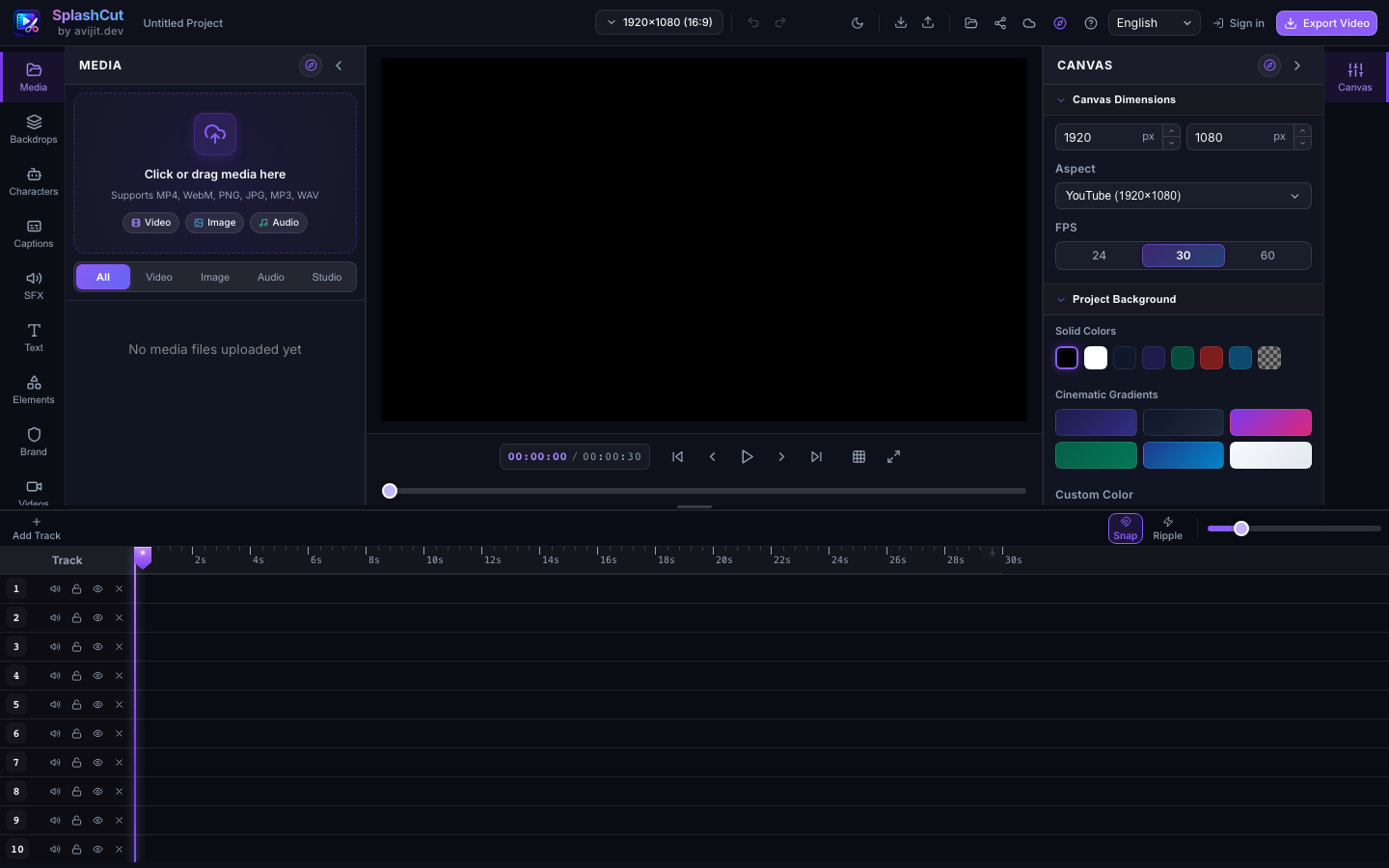
Multi-track timeline
Layer video, audio, text, and effects on a frame-accurate timeline.
SplashCut is a full-featured, frame-accurate timeline editor that runs entirely in your browser. No uploads, no servers — your footage stays on your device. Sign in to Google Drive for optional cloud sync.
A complete editing suite that never uploads a frame. Every tool below runs on your device.
Layer video, audio, text, and effects on a frame-accurate timeline.
Cut with magnetic snap and optional ripple edit.
6 text presets, custom typography, and 12 visual filters.
8 entrance/exit animations and 6 transition types.
Capture camera, mic, or screen. Convert text to speech.
Search Pexels, Unsplash, and Pixabay without leaving the editor.
Mobile-friendly, dark and light themes, runs in the browser.
Sign in to save and open projects from your Google Drive.
Sign in to save and open projects from your Google Drive.
SplashCut is not a service you upload to. Projects, recordings and exports are written to your browser's own storage, so no server holds your footage and there is no account to create. Google Drive sync is optional, and the one feature that does leave the device — live transcription — is disclosed before you use it.
What people ask before their first cut.
Yes. Every feature — timeline editing, captions, keyframes, effects and export — is free, with no account, no watermark and no export limit. Google Drive sync is optional and only used if you sign in.
No. SplashCut runs entirely in your browser. Files are read locally, edited on your device, and saved to your browser's own storage — nothing is sent to a server unless you explicitly save to Google Drive.
Yes. SplashCut is an installable app: after the first load the editor shell and the FFmpeg engine are cached, so you can open it and keep editing without a connection.
MP4, WebM and animated GIF, plus frame snapshots, at up to 4K depending on your browser. Preview and export share one renderer, so the exported file matches what you saw.
Yes. The editor has a touch-first mobile layout with a centred playhead, drag-to-scrub timeline, pinch zoom, and the same inspector tools as the desktop version.
28, including Spanish, Hindi, Arabic, Chinese, Japanese, French, German and Portuguese, with right-to-left support. Everything is translated in the app, not just the marketing page.
Open the editor and drop in your first clip. The engine caches on first load, so every visit after that starts instantly.
Open Editor